Send and receive email in Cloudflare Workers
A Cloudflare Worker sends email with Runearc in one fetch to its REST API, on any Workers plan and to any recipient. To receive, Runearc keeps the mail in an inbox and calls your Worker with a signed webhook; the Worker checks the signature with Web Crypto, reads the message and replies in the same thread.
POST https://api.runearc.com/v1/inboxes/{id}/messages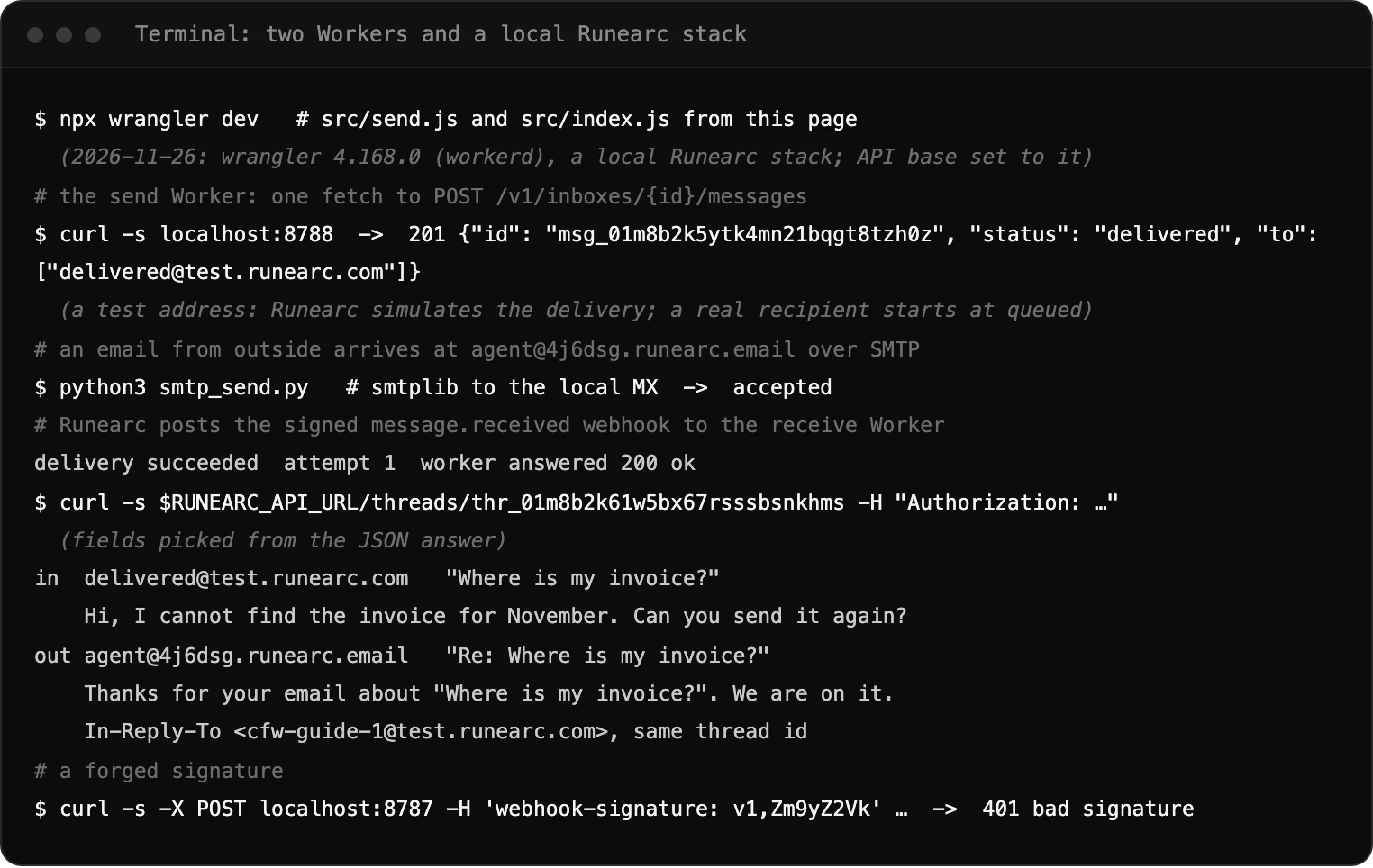
What Cloudflare offers today
Cloudflare has its own email product for Workers, and it is a good one. Since November 24, 2026, Email Sending is on the Workers Free plan, but only to verified destination addresses in your own Cloudflare account, such as your team's inboxes. Sending to any other recipient needs Workers Paid, with 3,000 emails included each month and then $0.35 per 1,000. Sending from a Worker is a send_email binding and one env.EMAIL.send() call.
For inbound mail there is Email Routing, unlimited on both plans. It forwards mail for your domain to verified addresses, or hands each message to a Worker's email() handler as raw MIME, where the Worker can forward it, reject it or send one reply. It does not host mailboxes: if you want to keep the mail, you store it yourself.
So: alerts to your own team from a Worker are free on Cloudflare today. Email to your users from a Worker on the free plan, mail kept in real inboxes, threads, IMAP and an MCP server that reads them are where Runearc fits. The rest of this page shows the Runearc side; the table below says when each is the better pick.
Sources, read on November 26, 2026
- [1]Cloudflare changelog, Email Sending on the Workers Free plan (November 24, 2026): developers.cloudflare.com/changelog/post/2026-11-24-email-sending-workers-free/
- [2]Cloudflare Email Service, pricing: developers.cloudflare.com/email-service/platform/pricing/
- [3]Cloudflare Email Service, Workers API (send_email binding): developers.cloudflare.com/email-service/api/send-emails/workers-api/
- [4]Cloudflare Email Service, email handler (receive in a Worker): developers.cloudflare.com/email-service/api/route-emails/email-handler/
- [5]Cloudflare Email Service, limits: developers.cloudflare.com/email-service/platform/limits/
- [6]Cloudflare Workers, pricing: developers.cloudflare.com/workers/platform/pricing/
- [7]Cloudflare blog, Email Service for agents (MCP server): blog.cloudflare.com/email-for-agents
Prices change. If something here is out of date or wrong, email hello@runearc.com and we will fix it.
Set up
One inbox, one Worker, one webhook. The Worker needs no npm packages.
- 1
Create an inbox
Sign up, create an API key and an inbox. It can live on your workspace'srunearc.emaildomain right away, or on your own domain once its records are live. Domain on Cloudflare? Runearc can write the DNS records for you in one click. - 2
Add the Worker
Put the code below insrc/index.js, add the two secrets withwrangler secret putand runwrangler deploy. Secrets never go inwrangler.toml. - 3
Create the webhook
POST /v1/webhookswith the Worker's URL andmessage.received. The answer holds the signing secret, shown once. - 4
Send it an email
Write to the inbox from any mail app. The Worker reads the email and replies in the same thread.
# An inbox for the Worker (on your runearc.email domain, or add "domain": "acme.com")
curl https://api.runearc.com/v1/inboxes \
  -H "Authorization: Bearer $RUNEARC_API_KEY" \
  -H "Content-Type: application/json" \
  -d '{"local_part": "agent", "display_name": "Acme agent"}'

# A webhook that calls the Worker for every email that inbox receives
curl https://api.runearc.com/v1/webhooks \
  -H "Authorization: Bearer $RUNEARC_API_KEY" \
  -H "Content-Type: application/json" \
  -d '{"url": "https://runearc-mail.<your-subdomain>.workers.dev", "event_types": ["message.received"], "inbox_id": "ibx_..."}'

# {"id": "whk_...", ..., "secret": "whsec_..."}   shown once: put it in RUNEARC_WEBHOOK_SECRET
npx wrangler secret put RUNEARC_API_KEY # a Runearc API key, mb_live_...
npx wrangler secret put RUNEARC_WEBHOOK_SECRET # the whsec_... from the next step
npx wrangler deployFor wrangler dev, put the same two names in a .dev.vars file instead.
# wrangler.toml
name = "runearc-mail"
main = "src/index.js"
compatibility_date = "2026-11-01"

[vars]
RUNEARC_INBOX_ID = "ibx_..." # the inbox the send Worker sends from
Send from a Worker
Sending is one fetch to POST /v1/inboxes/{id}/messages with to, subject and text or html. The answer is 201 with the message, status queued; its delivery shows up later as message.delivered or message.bounced on the same webhook if you subscribe to them. Add an Idempotency-Key header when your Worker might retry, so a retry never sends twice.
// src/send.js: send one email from a Runearc inbox.
export default {
  async fetch(req, env) {
    const res = await fetch(`https://api.runearc.com/v1/inboxes/${env.RUNEARC_INBOX_ID}/messages`, {
      method: "POST",
      headers: { authorization: "Bearer " + env.RUNEARC_API_KEY, "content-type": "application/json" },
      body: JSON.stringify({
        to: "ada@example.com",
        subject: "Your report is ready",
        text: "Hi Ada, the report you asked for is ready.",
      }),
    });
    // 201 with the message: {"id": "msg_...", "direction": "out", "status": "queued", ...}
    return new Response(await res.text(), { status: res.status });
  },
};
Sending receipts from noreply@ without an inbox? The Emails API takes a from on your verified domain and the same fetch shape. Until your workspace has a verified domain, runearc.email inboxes send in a sandbox: they can email the people in your workspace and test addresses, and anyone else gets 403 sandbox_recipient_not_allowed.
Receive and reply in a Worker
When an email reaches the inbox, Runearc posts a message.received event to your Worker. The Worker checks the signature against the raw body, fetches the full message, hands it to your agent and posts the answer to POST /v1/messages/{id}/reply. Runearc sets In-Reply-To, References and the Re: subject, so the reply threads in Gmail and Outlook.
- Web Crypto only.
verifyis the Standard Webhooks check: an HMAC SHA-256 ofwebhook-id.webhook-timestamp.body, keyed with the base64 part of the secret afterwhsec_. No Node compatibility flag, no package. - Old requests are refused. A timestamp more than 5 minutes away fails, so a captured request cannot be replayed later.
- The body is read once, as text. Parsing it first and serializing it again would change the bytes and break the signature.
// src/index.js: answer every email that reaches your Runearc inbox.
export default {
  async fetch(req, env) {
    const body = await req.text();
    if (!(await verify(req.headers, body, env.RUNEARC_WEBHOOK_SECRET))) return new Response("bad signature", { status: 401 });
    const evt = JSON.parse(body);
    if (evt.type !== "message.received") return new Response("ok");

    const api = (path, init = {}) => fetch("https://api.runearc.com/v1" + path, { ...init, headers: { authorization: "Bearer " + env.RUNEARC_API_KEY, "content-type": "application/json" } });
    const msg = await (await api("/messages/" + evt.data.message_id)).json(); // from, subject, text, html
    const answer = await yourAgent(msg); // your agent
    await api("/messages/" + evt.data.message_id + "/reply", { method: "POST", body: JSON.stringify({ text: answer }) });
    return new Response("ok");
  },
};

async function verify(h, body, secret) {
  if (Math.abs(Date.now() / 1000 - Number(h.get("webhook-timestamp"))) > 300) return false; // older than 5 minutes: a replay
  const key = await crypto.subtle.importKey("raw", Uint8Array.from(atob(secret.slice(6)), (c) => c.charCodeAt(0)), { name: "HMAC", hash: "SHA-256" }, false, ["sign"]);
  const mac = await crypto.subtle.sign("HMAC", key, new TextEncoder().encode(h.get("webhook-id") + "." + h.get("webhook-timestamp") + "." + body));
  return (h.get("webhook-signature") || "").split(" ").includes("v1," + btoa(String.fromCharCode(...new Uint8Array(mac))));
}

// Replace with your model call. It gets the message object and returns the reply text.
async function yourAgent(msg) {
  return "Thanks for your email about \"" + msg.subject + "\". We are on it.";
}
Runearc waits 10 seconds for a 2xx, then retries the same event, with the same webhook-id, for about 18 hours. If your agent is slower than that, answer first and do the work in ctx.waitUntil() (the third argument of fetch), and send the webhook-id as the reply's Idempotency-Key so a retried event never replies twice.
A real run
On November 26, 2026 we checked verify against the Standard Webhooks test vector in our webhooks docs with the clock set to its timestamp (accepted), with the real clock (refused as stale) and with a forged signature (refused). We then ran both Workers under wrangler dev against a local Runearc stack, with wrangler 4.168.0 (workerd), the API base pointed at the local stack and nothing else changed. The send Worker got a 201 with a message id. An email sent over SMTP landed in the inbox; Runearc delivered the signed webhook on the first attempt; the Worker fetched the message and posted its reply, which sits in the same thread with the Re: subject and an In-Reply-To pointing at the original. A forged signature got 401. The capture is at the top of this page.
Cloudflare Email Sending or Runearc
Both work from a Worker. Pick by who gets the mail and whether you need to keep it.
Swipe sideways to see the Cloudflare Email Service column.
| Feature | Runearc | Cloudflare Email Service |
|---|---|---|
| Alerts to your own team | Works; counts toward your monthly emails | Free on every plan, to verified addresses in your account [1] |
| Email to your users, free plan | 3,000 a month to any recipient once a domain is verified | Needs Workers Paid [2] |
| Email to your users, paid | Pro, $9 a month: 50,000 emails | Workers Paid ($5 a month minimum): 3,000 included, then $0.35 per 1,000 [2] [6] |
| Receiving | Into stored inboxes; a signed webhook with the parsed message | Email Routing, unlimited: forward to verified addresses, or raw MIME to a Worker [4] |
| Kept mailboxes and threads | Yes, readable over the API | No hosted mailboxes; store mail yourself [4] |
| IMAP for mail apps | imap.runearc.com | |
| MCP server | Reads, waits for and replies to stored mail | Sends and configures mail [7] |
| DNS host | Any; one click on Cloudflare and Vercel | Cloudflare DNS |
| Sending from a Worker | One fetch to the REST API | A send_email binding, plus REST and SMTP [3] |
Pick Cloudflare for alerts and reports to your own team, for a domain that only needs forwarding, or when you already pay for Workers and only send. The binding needs no API key and no extra vendor. Pick Runearc when a Worker on the free plan has to email your users, when mail must land in real inboxes your agent reads and answers in threads, or when people want the same inbox in a mail app over IMAP or an agent over MCP. You can use both: Cloudflare for team alerts, Runearc for the inbox your users write to.
What the Worker can do
Everything is a fetch with the same key.
message.receivedAnswer every email
One webhook per inbox, or for the whole workspace with noinbox_id.POST /v1/messages/{id}/replyReply in thread
Addreply_all: trueto copy everyone on the original.GET /v1/threads/{id}Read the whole thread
Give your agent the conversation, not just the last message.message.deliveredFollow delivery
Subscribe to delivery events on the same webhook.The same inbox for agents
The MCP server reads and answers the inbox your Worker uses, and mail apps see it over IMAP.
What it does not do
- No binding. Runearc is a REST API, so the Worker holds an API key as a secret. Cloudflare's
send_emailbinding needs none. - No raw MIME in the Worker. The webhook carries ids, the sender and the subject; the Worker fetches the parsed message.
GET /v1/messages/{id}/rawreturns the original if you need it. - Not inside Email Routing. A domain whose root MX points at Email Routing keeps it; put Runearc inboxes on a subdomain such as
agents.acme.com, or use yourrunearc.emailaddress. - New workspaces start small. In its first 7 days a workspace sends to 100 recipients a day. On the free plan, mail to people outside your workspace ends with a short Sent via Runearc line.
If it does not work
- The Worker answers 401 bad signature
- The secret does not match this webhook, or the clock check failed. Use the
whsec_from thePOST /v1/webhooksanswer for this webhook, set withwrangler secret put, and keep the body as the raw text. - wrangler dev fails on the compatibility date
- An older wrangler does not know a recent
compatibility_date; wrangler 4.110 refused 2026-11-01 in our run and 4.168 accepted it. Update wrangler, or use an earlier date. - No request reaches the Worker
- Check the webhook's deliveries with
GET /v1/webhooks/{id}/deliveries: each shows the status code your Worker gave and the first 500 characters of its answer. - The reply fails with 403 sandbox_recipient_not_allowed
- The workspace has no verified domain yet, so
runearc.emailinboxes may only email its members. Verify a domain to reply to anyone. - Two replies to one email
- The Worker took longer than 10 seconds and the event was retried. Answer first, work in
ctx.waitUntil(), and pass thewebhook-idas the reply'sIdempotency-Key. - 402 daily_send_limit_reached
- The new workspace limit of 100 recipients a day, which lifts 7 days after the workspace was created. Every error's fix is on the errors page.
- Delivered, but in spam
- Send one email to the email deliverability test to check SPF, DKIM and DMARC for your domain.
Running on Node instead? The Node.js guide sends and verifies webhooks with the same API. Building an agent that lives in its inbox? See Runearc for AI agents, and Cloudflare Email Routing alternatives if you only need forwarding. Every tool is in the integrations directory. Choosing the service before implementing it? Compare Cloudflare Email Sending and Resend, then Cloudflare Email Routing and inbound APIs. For a reply-by-email feature, use the durable SaaS reply ingestion example.
Questions
Can a Cloudflare Worker send email on the free plan?
Yes, with Cloudflare's own Email Sending, to verified destination addresses in your Cloudflare account. Sending to anyone else needs Workers Paid. With Runearc, a Worker on any Cloudflare plan sends with one fetch; Runearc's free plan includes 3,000 emails a month to any recipient once your domain is verified.
Can a Worker receive email?
Yes, two ways. Cloudflare Email Routing can hand each email for your domain to a Worker's email() handler as raw MIME. With Runearc, mail lands in a stored inbox and Runearc calls your Worker's fetch handler with a signed webhook; the Worker reads the parsed message over the API.
Why verify the signature with Web Crypto?
Workers run without Node's crypto module unless you turn on Node compatibility. crypto.subtle is always there, and the verify function above is the whole Standard Webhooks check in four lines, with no library.
Does my domain have to be on Cloudflare?
Not for Runearc. Any DNS host works; you add the records Runearc lists. On Cloudflare, Runearc can write them for you in one click. Cloudflare's Email Service needs the domain on Cloudflare DNS.
Did you test this?
Yes, on November 26, 2026. The verify function passes the Standard Webhooks test vector from our webhooks docs. Both Workers ran under wrangler dev against a local Runearc stack: a real email arrived over SMTP, the webhook reached the Worker, and its reply landed in the same thread.
What does it cost?
Runearc's free plan includes 3 inboxes, 3,000 emails a month and 3 custom domains, with no card. Pro is $9 a month. Received mail does not count against sending.
Related integrations
- Next.jsSend from a route handler with the Resend SDK, the Runearc SDK or fetch.
- ExpressOne fetch call in a route; errors come back with a fix.
- MastraMCPClient loads Runearc's tools, or add createTool tools over the API.
- LangChainMCPAdapter loads Runearc's tools, or wrap the API with tool(). JS and Python.

Read next
Put Runearc to work
Get inboxes, sending, your own domains and MCP in one workspace. The free plan includes 3 inboxes, 3,000 emails a month and 3 custom domains, with no card.