Give a LangChain agent its own email inbox
Runearc gives a LangChain agent its own email inbox. Load Runearc's remote MCP server with the official MCP adapter, or wrap the REST API in three tool() functions. The agent can create an address, wait for a verification email and get the code already extracted, read and reply to mail, and send from your domain.
npm install langchain @langchain/mcp-adapters zod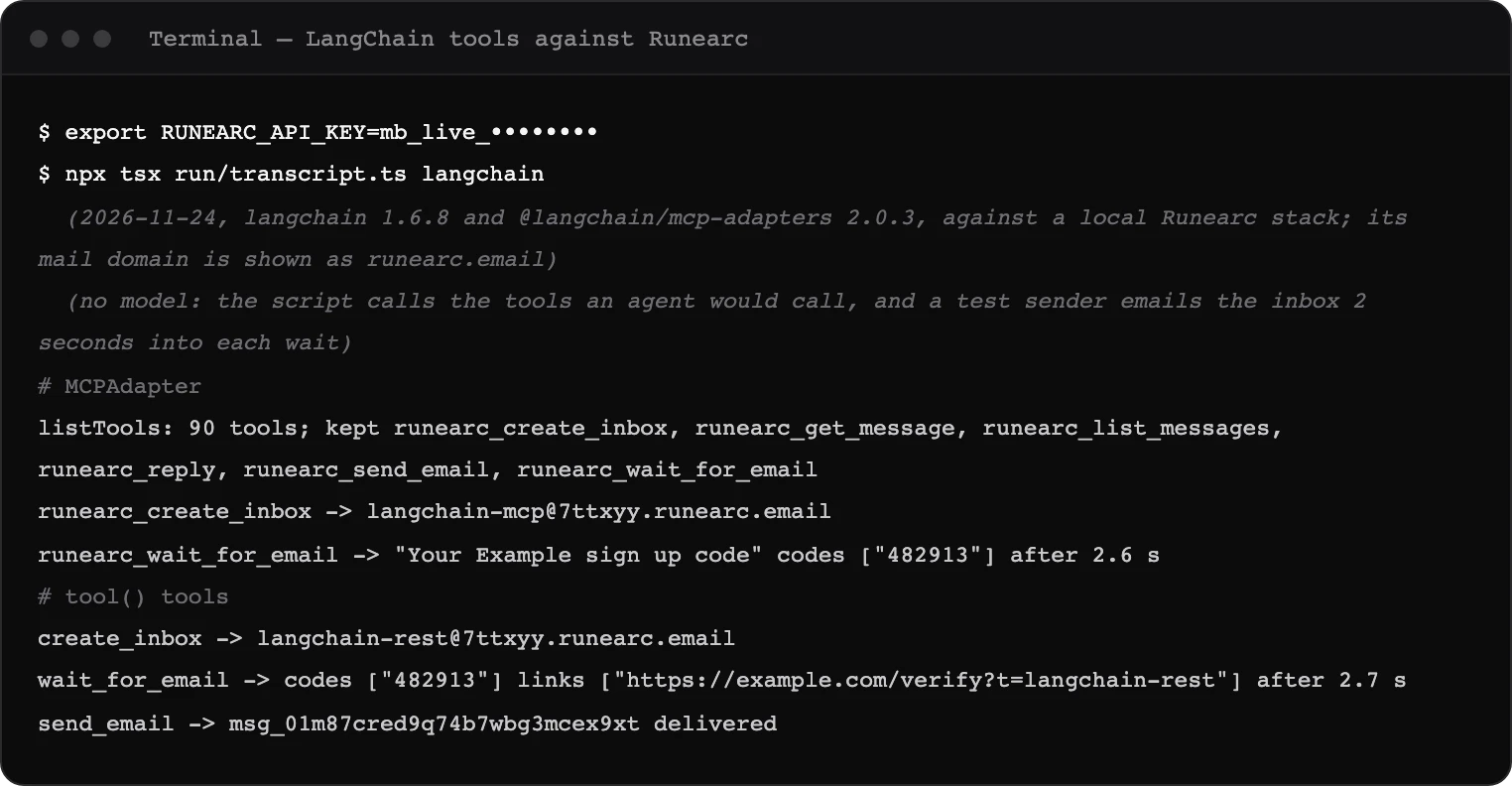
What the agent can do
create_inboxIts own address
A new inbox such assignup-test@k7m3qz.runearc.email, or an address on your verified domain. Not your Gmail.wait_for_emailWait for a code
One call that blocks until the email arrives and returns it with the one time codes and links already extracted.get_message, replyRead and reply
Read messages and threads, and reply in the thread with the right headers so it threads in Gmail and Outlook.send_emailSend from your domain
Send from any of its inboxes. Once a domain is verified, it can email anyone fromagent@yourdomain.com.
Set up
Create a key, install two packages, then pick one of the two paths below.
- 1
Create an API key
In the Runearc dashboard, create an API key and export it asRUNEARC_API_KEY. An inbox key limits the agent to one address. - 2
Install
Addlangchain,@langchain/mcp-adapters,zodand your model's provider package, and set its key. - 3
Pick a path
Path 1 connects the MCP server and gets every email tool. Path 2 adds three tools you own, over the REST API.
npm install langchain @langchain/core @langchain/mcp-adapters @langchain/anthropic zod

export RUNEARC_API_KEY=mb_live_xxxxxxxxx      # Runearc dashboard, API keys
export ANTHROPIC_API_KEY=...                  # or the key of the model you use
Path 1: the MCP server
LangChain's official MCP adapter, MCPAdapter from @langchain/mcp-adapters, connects to Runearc's remote MCP server at https://mcp.runearc.com/mcp over streamable HTTP, with the key in an Authorization header. listTools() names each tool after the server, such as runearc_wait_for_email. The server offers every Runearc action, from domains to campaigns, so the snippet keeps the six email tools; an agent picks better from a short list.
import { MCPAdapter } from "@langchain/mcp-adapters";
import { createAgent } from "langchain";

const mcp = new MCPAdapter({
  servers: {
    runearc: {
      url: "https://mcp.runearc.com/mcp",
      headers: { Authorization: `Bearer ${process.env.RUNEARC_API_KEY}` },
    },
  },
});

// The server offers every Runearc action; give the agent the email ones.
const EMAIL = ["create_inbox", "wait_for_email", "get_message", "list_messages", "send_email", "reply"];

try {
  const all = await mcp.listTools(); // named runearc_<tool>
  const tools = all.filter((t) => EMAIL.some((n) => t.name === `runearc_${n}`));
  const agent = createAgent({ model: "anthropic:claude-sonnet-5", tools });
  const result = await agent.invoke({
    messages: [
      {
        role: "user",
        content: "Create an inbox called signup-test, wait for the verification email, and tell me the code.",
      },
    ],
  });
  console.log(result.messages.at(-1)?.text);
} finally {
  await mcp.close();
}
import asyncio
import os
from fastmcp.client import Client
from langchain.agents import create_agent
from langchain.mcp import MCPAdapter
EMAIL = {"create_inbox", "wait_for_email", "get_message", "list_messages", "send_email", "reply"}
async def main():
runearc = Client("https://mcp.runearc.com/mcp", auth=os.environ["RUNEARC_API_KEY"])
async with MCPAdapter(runearc) as mcp:
# The server offers every Runearc action; give the agent the email ones.
tools = [t for t in await mcp.list_tools() if t.name in EMAIL]
agent = create_agent("anthropic:claude-sonnet-5", tools)
result = await agent.ainvoke({"messages": [{
"role": "user",
"content": "Create an inbox called signup-test, wait for the verification email, and tell me the code.",
}]})
print(result["messages"][-1].text)
asyncio.run(main())The tool arguments, such as subject_contains and timeout_seconds on wait_for_email, are listed on the MCP server docs page. Close the adapter with close() when you are done. In Python, the same adapter lives in langchain.mcp (install langchain[mcp,anthropic]; LangChain marks that namespace beta), takes a FastMCP Client with the key as auth, and with a single server does not prefix the tool names.
Path 2: tool() over the API
Three tools built with tool() from langchain call the REST API with fetch: POST /v1/inboxes, the blocking wait endpoint GET /v1/inboxes/{id}/wait, and POST /v1/inboxes/{id}/messages. No Runearc package to install. Each tool returns the API's JSON as a string. Errors come back to the agent as JSON with a code, a message and a fix it can follow, and a 408 wait_timeout is safe to call again.
import { tool } from "langchain";
import * as z from "zod";

const API = "https://api.runearc.com/v1";

async function runearc(path: string, init: RequestInit = {}) {
  const res = await fetch(API + path, {
    ...init,
    headers: {
      Authorization: `Bearer ${process.env.RUNEARC_API_KEY}`,
      "Content-Type": "application/json",
    },
  });
  // Errors come back as {"error": {code, message, fix}}, which the agent can act on.
  return JSON.stringify(await res.json());
}

export const createInbox = tool(
  (input) => runearc("/inboxes", { method: "POST", body: JSON.stringify(input) }),
  {
    name: "create_inbox",
    description: "Create an email inbox the agent owns. Returns its id and address.",
    schema: z.object({
      local_part: z.string().optional().describe("The part before the @, such as signup-test"),
      domain: z.string().optional().describe("A verified custom domain; omit for the runearc.email domain"),
    }),
  },
);

export const waitForEmail = tool(
  ({ inbox_id, ...filters }) => {
    const q = new URLSearchParams();
    for (const [k, v] of Object.entries(filters)) if (v !== undefined) q.set(k, String(v));
    return runearc(`/inboxes/${inbox_id}/wait?${q}`); // 408 wait_timeout: safe to call again
  },
  {
    name: "wait_for_email",
    description:
      "Block until an email matching the filters reaches the inbox (up to 120 seconds). " +
      "Returns the message with one time codes and links already extracted.",
    schema: z.object({
      inbox_id: z.string(),
      from: z.string().optional().describe("Part of the sender address"),
      subject: z.string().optional().describe("Part of the subject"),
      timeout: z.number().int().min(1).max(120).default(60),
    }),
  },
);

export const sendEmail = tool(
  ({ inbox_id, ...message }) =>
    runearc(`/inboxes/${inbox_id}/messages`, { method: "POST", body: JSON.stringify(message) }),
  {
    name: "send_email",
    description: "Send an email from one of the agent's inboxes.",
    schema: z.object({
      inbox_id: z.string(),
      to: z.string().describe("Recipient address"),
      subject: z.string(),
      text: z.string(),
    }),
  },
);
import { createAgent } from "langchain";
import { createInbox, sendEmail, waitForEmail } from "./runearc-tools.js";
const agent = createAgent({
model: "anthropic:claude-sonnet-5",
tools: [createInbox, waitForEmail, sendEmail],
systemPrompt: "You have your own email inbox. Use create_inbox, wait_for_email and send_email.",
});
const result = await agent.invoke({
messages: [{ role: "user", content: "Create an inbox called signup-test and wait for the verification code." }],
});
console.log(result.messages.at(-1)?.text);Add a reply tool the same way with POST /v1/messages/{id}/reply and a text field; the fields are on the sending docs page.
A real run
Every TypeScript snippet on this page passes tsc --noEmit with langchain 1.6.8, @langchain/core 1.5.1, @langchain/mcp-adapters 2.0.3, zod 4.6.7 and TypeScript 7.0.2, tested on November 24, 2026. The Python variant ran the same day with langchain 1.5.2 and fastmcp 4.2.5 on Python 3.12: its tools created an inbox and the wait returned the code. We then ran both paths against a local Runearc stack without a model: a script called the tools an agent would call, and a test sender emailed each new inbox 2 seconds into the wait. Through MCP, runearc_wait_for_email returned the code 482913 2.6 seconds after the call; through the tool() tools it returned the code and the link, and send_email reached delivered. We did not record a model choosing the tools. The capture is at the top of this page.
What it does not do
- It does not read a personal mailbox. The agent works with Runearc inboxes only: the ones it creates, your support inboxes and the Catch-all.
- The wait only sees new mail. It matches messages stored after the call starts. If the email may already be there, pass
after(or checklist_messagesfirst). - Sending is a sandbox until you verify a domain. Before that, inboxes can email your team and the test addresses; other recipients get
403 sandbox_recipient_not_allowed. - No draft step.
send_emailandreplysend at once. If a person should approve outgoing mail, leave those tools out. - The MCP server takes an API key, not OAuth. Each agent or teammate uses a key from the dashboard.
- Plan limits apply. The free plan has 3 inboxes and 3,000 emails a month; delete inboxes the agent no longer needs.
If it does not work
- Authentication failed (HTTP 401)
RUNEARC_API_KEYis not set in the process that runs the agent, so the header readsBearer undefined. Export it, or load it from your env file before the client is created.- unknown format "uint64" ignored
- A warning from schema validation about
timeout_seconds. It is harmless; the tool still works. - 408 wait_timeout
- Nothing matching arrived in time. Call the wait again, loosen the
subjectorfromfilter, or passafterif the mail may have arrived before the call. - inbox_limit_reached
- The plan's inbox count is used up. Delete inboxes the agent is done with, or reuse one; every error's fix is on the errors page.
Building with Mastra as well? The Mastra guide has the same two paths with MCPClient and createTool, the OpenAI Agents SDK guide does it in Python with @function_tool, and the Vercel AI SDK guide does it with createMCPClient and a recipient allowlist. For a coding agent rather than an app, see Claude Code with the MCP server. Everything Runearc gives an agent is on the agent mail page, and every integration is on the integrations page.
Questions
Which path should I pick, MCP or tool()?
MCP if you want every email action with no code to maintain: new Runearc tools show up on their own. tool() if you want a short, fixed tool list with your own names and descriptions, or no MCP connection in production. Both call the same Runearc API.
Does this work with LangGraph?
Yes. MCPAdapter and tool() both return LangChain tools, which a LangGraph graph or a ToolNode takes as they are. createAgent in the snippets is LangChain's own agent, built on LangGraph.
Can the agent read my Gmail with this?
No. Runearc gives the agent inboxes of its own, on a private runearc.email domain or on a domain you verify. It never connects to a personal mailbox. To read an existing Gmail or Outlook account, use a mailbox API instead.
How does the agent get a verification code?
It calls wait_for_email right after it signs up with the inbox address. The call blocks until a matching email arrives (up to 120 seconds) and returns the message with codes and links already pulled out, so the model does not have to parse the email.
Can I limit what the agent can touch?
Yes. Create an inbox key in the dashboard: it can read, wait, reply and send from one inbox and nothing else. Give that key to the agent instead of a full access key.
Does it work with other models?
Yes. The tools do not depend on the model. anthropic:claude-sonnet-5 in the snippets is an example; use any provider:model string LangChain supports, install that provider's package and set its API key.
Related integrations
- MastraMCPClient loads Runearc's tools, or add createTool tools over the API.
- OpenAI Agents SDKMCPServerStreamableHttp loads Runearc's tools, or add @function_tool tools over the API.
- Vercel AI SDKFive tool() tools over the API, or createMCPClient. AI SDK 7, tested.
- Claude CodeOne command adds the MCP server; the agent gets its own inboxes.


Read next
Put Runearc to work
Get inboxes, sending, your own domains and MCP in one workspace. The free plan includes 3 inboxes, 3,000 emails a month and 3 custom domains, with no card.