Send Clerk auth emails through Runearc
Clerk takes no custom SMTP settings. To send its verification codes, magic links and invitations through Runearc from your own domain, turn off Delivered by Clerk on each template, subscribe a route to the email.created webhook, verify the signature and pass the email to Runearc's send API. One file, tested below.
Delivered by Clerk off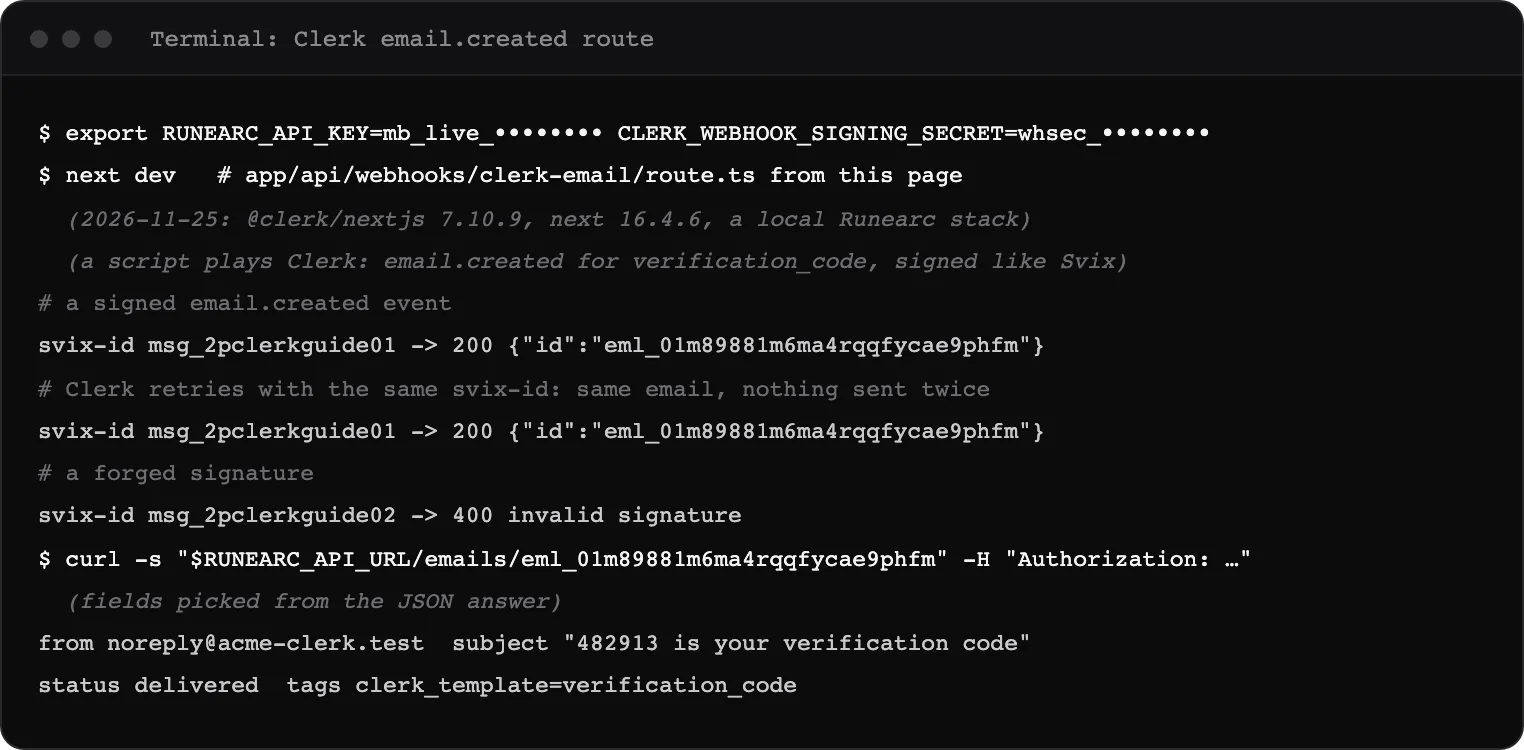
How Clerk hands you its emails
Clerk sends its auth emails with its own provider, and in production they already leave from your domain. It has no SMTP settings to point at Runearc. What it offers instead is a switch on each email template, Delivered by Clerk. Turn it off and Clerk stops sending that email; it fires an email.created webhook with the subject, the HTML and text body, the recipient and the data behind it (the otp_code for a verification code). Your route sends it. Clerk's docs say there is no way to turn delivery off for all templates at once, so you switch each one.
Why do it? Your auth email then sits in the same send log, events and suppression list as the rest of your app's email, tagged with the Clerk template it came from, and you can rewrite any template in your own words. If Clerk's delivery already works for you, keeping it is a fine choice.
Sources, read on November 25, 2026
- [1]Clerk, email deliverability: managing your own email delivery: clerk.com/docs/guides/development/troubleshooting/email-deliverability
- [2]Clerk, email and SMS templates: clerk.com/docs/guides/customizing-clerk/email-sms-templates
- [3]Clerk, webhooks overview: clerk.com/docs/guides/development/webhooks/overview
- [4]Clerk, sync data with webhooks (verifyWebhook, endpoint setup): clerk.com/docs/guides/development/webhooks/syncing
- [5]Novu, Clerk integration guide (template slugs): docs.novu.co/guides/webhooks/clerk
If something here is out of date or wrong, email hello@runearc.com and we will fix it.
Set up
One step in Runearc, one in your app, two in Clerk. Add the endpoint before you switch delivery off, or emails sent in between are lost.
- 1
Verify your domain
Add it in Runearc and publish the records it lists. The domains docs explain each one. Then create a sending API key. - 2
Add the route
Put the file below atapp/api/webhooks/clerk-email/route.ts, set the two variables and deploy. It must be reachable without a session. - 3
Add the endpoint in Clerk
Clerk Dashboard, Webhooks, Add Endpoint: your route's URL, subscribed toemail.created. Copy its Signing Secret. - 4
Switch Clerk's delivery off
Under Customization, Emails, open each template you want to move and turn off Delivered by Clerk.
npm install @clerk/nextjsAlready using Clerk with Next.js? You have it. Other frameworks import verifyWebhook from @clerk/backend/webhooks.
# .env.local
RUNEARC_API_KEY=mb_live_xxxxxxxxx            # a Runearc sending key
CLERK_WEBHOOK_SIGNING_SECRET=whsec_xxxxxxxx  # Clerk Dashboard, Webhooks, your endpoint, Signing Secret
The route
verifyWebhook checks the svix-id, svix-timestamp and svix-signature headers against your signing secret and returns the typed event. The route then sends the email with POST /v1/emails, from any address on your verified domain. Three details the usual examples leave out:
- Retries never send twice. Clerk retries an event until it gets a 2xx, and every attempt carries the same
svix-id. Used as the Idempotency-Key, a retry returns the first email's id instead of sending again. - Only temporary errors are retried. A 429 or 5xx from Runearc answers Clerk with 503 so it tries again later. A 4xx such as
sender_not_verifiedwill not fix itself, and a code that arrives hours late is useless, so the route logs it and answers 200. - Each send is tagged with its template.
clerk_template=verification_codeand so on, so the send log and delivery events show which Clerk email it was.
import { verifyWebhook } from "@clerk/nextjs/webhooks";
import type { NextRequest } from "next/server";

// Any address on a domain you verified in Runearc.
const FROM = "Acme <noreply@acme.com>";
const RUNEARC_API = process.env.RUNEARC_API_URL ?? "https://api.runearc.com/v1";

export async function POST(req: NextRequest) {
  let evt;
  try {
    evt = await verifyWebhook(req); // checks the signature with CLERK_WEBHOOK_SIGNING_SECRET
  } catch {
    return new Response("invalid signature", { status: 400 });
  }
  if (evt.type !== "email.created") return new Response("ignored");

  const email = evt.data;
  // An email Clerk delivered itself needs nothing from us.
  if (email.delivered_by_clerk || !email.to_email_address) return new Response("skipped");

  const res = await fetch(`${RUNEARC_API}/emails`, {
    method: "POST",
    headers: {
      Authorization: `Bearer ${process.env.RUNEARC_API_KEY}`,
      "Content-Type": "application/json",
      // Clerk retries an event with the same svix-id, so a retry never sends twice.
      "Idempotency-Key": req.headers.get("svix-id") ?? email.id,
    },
    body: JSON.stringify({
      from: FROM,
      to: email.to_email_address,
      subject: email.subject ?? "",
      html: email.body,
      text: email.body_plain ?? undefined,
      tags: [{ name: "clerk_template", value: (email.slug ?? "unknown").replace(/[^A-Za-z0-9_-]/g, "_") }],
    }),
  });

  if (!res.ok) {
    // Runearc errors are {"error": {"code", "message", "fix"}}.
    console.error("Runearc send failed", res.status, await res.text());
    // 429 and 5xx are temporary: a non 2xx answer makes Clerk retry later.
    // Other 4xx (an unverified sender, a plan limit) will not fix themselves: log and stop.
    const temporary = res.status === 429 || res.status >= 500;
    return new Response("send failed", { status: temporary ? 503 : 200 });
  }
  return Response.json(await res.json()); // {"id": "eml_..."}
}
clerkMiddleware() protects no route by default. If yours protects everything, leave /api/webhooks(.*) public, as Clerk's webhook guide says. RUNEARC_API_URL is optional; we set it to point the run at a local stack.
A real run
The route passes tsc --noEmit with @clerk/nextjs 7.10.9 (@clerk/backend 3.33.0), next 16.4.6 and TypeScript 7.0.2, tested on November 25, 2026. We then served it with next dev against a local Runearc stack and played Clerk's part with a script: it built an email.created event for the verification_code template and signed it with the Standard Webhooks library, the scheme Clerk's webhook sender uses. The route answered with a Runearc email id and the email was delivered; sending the same event again with the same svix-id returned the same id and sent nothing; a forged signature got 400. We did not run it against a live Clerk instance. The capture is at the top of this page.
What it sends
Every template you switch off. Each has a slug, which the route turns into a tag.
verification_codeVerification codes
The sign up and sign in code. The event also carriesotp_codeif you want your own wording.magic_link_sign_inMagic links
Passwordless sign in and sign up links, sent as Clerk rendered them.invitationInvitations
App invitations, andorganization_invitationfor organizations.reset_password_codePassword resets
The reset code, from your own address.Logged like any other send
Each email shows in Runearc's send log with its status, next to mail from your Next.js route handlers.
What it does not do
- No SMS. Clerk sends SMS through a separate
sms.createdevent. Runearc sends email only. - No switch for every template at once. Clerk turns delivery off per template. Templates you leave on keep going through Clerk.
- No delivery promise from the webhook. Clerk's webhooks are asynchronous and its docs say they are not guaranteed to be immediate. Verification codes expire, so watch the endpoint's failed attempts in Clerk's dashboard.
- It does not render Clerk's templates. Runearc sends the HTML Clerk put in the event, or the copy you write. Template edits stay in Clerk.
- New workspaces start small. In its first 7 days a workspace sends to 100 recipients a day; the free plan has 3,000 emails a month.
If emails do not arrive
- Clerk shows failed attempts with 400
- The signature check failed. Use the Signing Secret shown on this endpoint's page in the same Clerk instance you are testing, and do not read the request body before
verifyWebhookdoes. - Failed attempts with a redirect or 401
- Your middleware protects the route. Leave
/api/webhooks(.*)public. - The route logs 403 sender_not_verified
FROMis not on a verified domain of the key's workspace. Verify the domain or change the address;GET /v1/senderslists what you can use.- The route answers skipped
- The event says
delivered_by_clerk: Delivered by Clerk is still on for that template, so Clerk sent it. Turn it off if you want it through Runearc. - 402 daily_send_limit_reached
- The new workspace limit of 100 recipients a day. It lifts 7 days after the workspace was created; every error's fix is on the errors page.
- Delivered, but in spam
- Send one code to the email deliverability test to check SPF, DKIM and DMARC for your domain.
Using Supabase instead? The Supabase Auth custom SMTP guide needs no code at all. For the rest of your app's email from the same key, see the Next.js guide; building a SaaS on Clerk, see Runearc for SaaS teams. Every tool is in the integrations directory.
Questions
Does Clerk support custom SMTP?
No. Clerk has no host, port and password form like Supabase's. Its docs describe one way to use another provider: turn off Delivered by Clerk on a template and send the email yourself from the email.created webhook. That is what this page sets up.
Is it email.created or emails.created?
email.created. That is the event type in @clerk/backend and on Clerk's email deliverability page, and the one the route checks. Clerk's templates page and some third party guides write emails.created.
Did you test this with Clerk?
We ran the route itself: typechecked against @clerk/nextjs 7.10.9, then served with next dev and sent through a local Runearc stack on November 25, 2026. A script played Clerk's part and signed the email.created event the way Clerk's webhook sender does. We did not run it against a live Clerk instance.
Can I write my own email copy instead of Clerk's?
Yes. The event carries the email Clerk rendered and the data behind it, such as otp_code for a verification code. Build your own subject and body from evt.data.data and send that instead of body.
Will users get two emails?
No. Once Delivered by Clerk is off for a template, Clerk stops sending it. If an event ever arrives for an email Clerk delivered itself, its delivered_by_clerk field is true and the route skips it.
What does it cost?
Runearc's free plan includes 3 inboxes, 3,000 emails a month and 3 custom domains, with no card. Pro is $9 a month.
Related integrations
- Supabase AuthCustom SMTP for sign up, magic link and password reset emails.
- Next.jsSend from a route handler with the Resend SDK, the Runearc SDK or fetch.
- Better AuthOne fetch helper for verification, reset, magic link, OTP and invitation emails.
- Auth.jsMagic links through the Nodemailer provider on Runearc's SMTP, or the API with fetch.

Read next
Put Runearc to work
Get inboxes, sending, your own domains and MCP in one workspace. The free plan includes 3 inboxes, 3,000 emails a month and 3 custom domains, with no card.